
Cinematic Editor Changelog
Changelog for Cinematic Editor Extension. Available at MCPEDL, CurseForge and Modbay.
2.2.4
- Scene data format generated by Cinematic Editor Pro v2.2.3 or below will not be compatible with this version. Please re-export the scene with v2.2.4 or above to make it compatible with this version.
2.2.3
- Fixed an issue where playing a scene would cause the game to freeze when hosted on powerful devices.
2.2.2
- Updated distribution files to not include redundant files.
- Distribution files are now bundled to .mcaddon format to make it easier for users to import the add-on to their worlds.
2.2.1
- Fixed effects not working properly.
- Added the ability to import scenes to Cinematic Editor.
2.2.0
- Added Camera Distance field in Editor Debug Camera settings, allowing users to adjust the distance of the debug camera from the player for better scene visualization.
- Fixed an issue with Vibrant Visuals not working in Minecraft Editor.
2.1.0
-
Added Vibrant Visuals toggle in Cinematic Editor panel.
-
Vibrant Visuals lets you preview the creation of your own custom scenes in real-time.
This setting is not saved when reloading a Project or a custom scene.
Note: It seems like this feature is broken natively in Minecraft Editor at the moment, so it may not work as expected.
-
-
Added image in the Cinematic Editor tooltip for better visibility.
-
Editor Add-on is now compatible with Minecraft v1.21.130 or above, rather than just Minecraft v1.21.130.
2.0.2
- Scene data are now minified when exported to clipboard.
2.0.1
- Cinematic Editor now requires Minecraft v1.21.110
2.0.0
-
Cinematic Editor now requires Minecraft v1.21.100
-
Updated Dependencies to use
@minecraft/server2.2.0-beta -
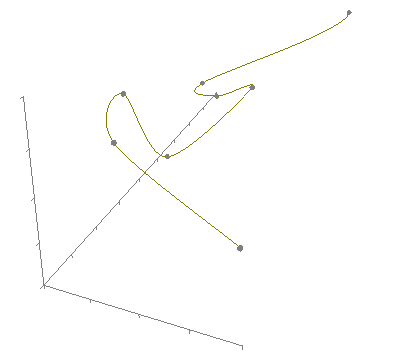
Spline Interpolation System: Added support for Hermite spline interpolation for smoother camera movement between keyframes
-
New "Interpolation" dropdown with Line and Hermite options
-
Spline Subdivisions setting (2-20) for controlling smoothness vs performance
-
Added real-time spline path visualization with different spline types displayed, numbered keyframe labels, snap-to-block positioning.
-
Keyframe data can be modified by moving the respective widget.
-
Added hermite interpolation support.
-
-
Enhanced Camera Controls:
- Added FOV (Field of View) control for keyframes
- New camera settings including camera height (720p default), width (1280p default), and default FOV (70°)
- Debug Camera System: Visual camera frustum display with widget-based visualization
- Real-time camera position and rotation tracking
- Interactive camera frustum corners with spline connections
- Configurable aspect ratio and viewing distance
- Toggle visibility through settings
-
Keyboard Shortcuts: Added
CTRL + SHIFT + Chotkey to quickly toggle the Cinematic Editor tool -
Improved User Interface:
- Redesigned Scene Settings panel. Now it's located in the core menu, along with help, and testing features.
- Added comprehensive tooltips and help documentation
- Better error handling and user feedback with action bar notifications
-
Scene Export:
- Added multiple export formats (optimized v3 and raw v2 JSON) with clipboard integration. Scene Import is not supported currently, but will be implemented soon.
- Deprecated v1 scene export format.
- Added support for camera fade effects, command execution, and time delays
- Added instant camera transition, available on the easing dropdown.
1.4.1
- Cinematic Editor now only works on Minecraft v1.21.50
- Refracted codebase to not use deprecated Editor APIs
- Fixed a bug where coordinates wasn't serialize to string
- Renamed
extensionNamefield to 'CameraEditor'
1.4.0
- Editor extension now requires Minecraft Preview 1.21.30
- Added ability to edit camera location and rotation on existing keyframes.
- Player location and player rotation now shows selected keyframe's data instead of current player's data.
- Vector3 fields now disables when there isn't a scene.
- Editor can now export HUD visibility settings to cinematic runtime add-on.
1.3.2
- Fix an issue with HUD elements not displaying when toggled on.
- When playing the scene the following HUD elements can be shown if toggled on: ProgressBar, Hunger, AirBubbles, HorseHealth, StatusEffects, ItemText
- Updated manifest
- Resource pack now requires the same minimum engine version as behavior pack.
1.3.1
- Cinematic Editor extension is compatible with Minecraft Preview 1.21.20
- Fix an issue with missing strings caused by editor API change
- [Experimental] Add toggles for showing specific HUD elements
1.3.0
- Editor extension now requires Minecraft v1.21.10 Previews to run
- Renamed 'Run Timeline' to 'Play Scene' - Plays the scene which is stored in editor extension storage.
- Renamed 'Export Keyframes' to 'Export Scene' - Export the scene from editor extension storage to Cinematic Editor Runtime Add-On, which can be played through Scene Player item.
- Group Export Scene and Play Scene button into 'Scene Action' pane
- Added 'Reset Scene' button - Reset editor extension camera scene.
- Updated Add-On Manifest metadata, changing license from MIT to All Rights Reserved.
1.2.0
- Module version property is now the same as
header.version - Editor extension is now compatible with 1.20.80-preview.21 or above.
- Fix Vector class not exported from '@minecraft/server' module in 1.20.80-preview.21.
- Output files are now bundled.
1.1.1
- Editor extension is now compatible with 1.20.80 previews.
- HUD is now hidden when 'Run Timeline' is pressed
- When pressing 'Export Keyframes', the keyframe data will automatically transfer to Cinematic Runtime add-on. This requires cinematic runtime add-on to be loaded on editor world.
1.0.5
- Fix a critical bug where world hangs when 'Run Timeline' is pressed.
1.0.4
- Editor extension is now compatible with 1.20.70 previews
1.0.3
- Exported data from Export Keyframes can now be used in Cinematic Runtime Add-On
- Behavior packs and resource packs are now dependent, so when one of the resource or behavior pack is applied to world the other pack is also applied automatically.
1.0.2
- Update pack name and description
- Add-on is now compatible with 1.20.60 previews.
1.0.1
- Export keyframes now converts keyframes into /camera commands
1.0.0
- Added extension icon (icon by Mojang)
0.3.0-beta
- Refactor storage system to make it compatible for latest Dynamic Properties changes.
- Fix a bug where Ease Type and Ease Time aren't sync when changing keyframe selection.
- Fix Ease Time not being able to input float numbers.
- Export Content field is now hidden unless 'Export Keyframes' button is pushed.
- Easing values are now saved automatically when changed.
0.2.0-beta
- Increase maximum stored keyframes from 9 to 600
- Fix the delay caused by running timeline
- Text pane now disallow user from modifying the export content
- Add easing into cinematic editor
0.1.0-beta
- Add tool and pane with no functionality.
- Add export content
- Add player location, rotation